Step 4 – Set up Output Tables
The fourth step in creating a program is to set up the output tables for the sensor measurements you have selected. The output tables must be completed or no data will be stored in the datalogger's memory.
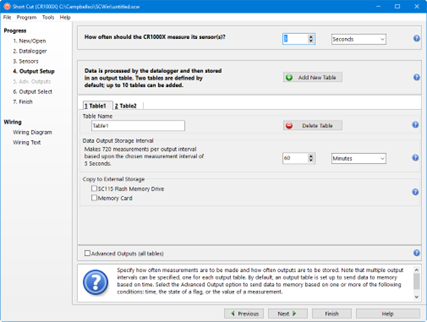
In the How often should the datalogger measure its sensor(s)? field, specify how often the datalogger will execute the instructions in its program. This is known as the measurement or scan interval.
When choosing a scan interval, remember that faster scan intervals will use more power. For most applications, a 10 to 60 second scan interval is sufficient. If faster scan intervals are required for your application, make sure there is sufficient time for the execution of all instructions in the program (refer to the section in the datalogger manual on Execution Intervals for additional information).
NOTE: By default, data is sent to memory based on time. Data can also be sent to memory based on one or more of the following conditions: time, the state of a flag, or the value of a measurement. This is set up from the Advanced Outputs screen. To use the Advanced Outputs screen, select the Advanced Outputs (all tables) check box at the lower left of the Output Setup screen. The Data Output Storage Interval field will be removed from the Output Setup screen (and moved to the Advanced Outputs screen). After completing the fields on the Output Setup screen and pressing Next, Short Cut will advance to the Advanced Outputs screen.
Two tables are defined by default. Additional tables can be added by pressing the Add Table button. Short Cut limits the number of output tables to 10. An output table can be removed by clicking on the table to make it the active table and pressing the Delete Table button.
Steps for completing the standard table output are given below:
-
Name the output.
-
Mixed-array dataloggers: The Array ID field is for the identification number that will be used by the datalogger to identify the output array. You can accept the default ID number, or type a new number in the field (1 to 511 are valid options). A unique array ID must be used for each output table.
-
Table-based dataloggers: The Table Name field is the name that will be used for the data table in the datalogger. You can accept the default Name of Table1, Table2, etc., or type a new name in the field. The table name can be up to 20 characters.
-
-
The Data Output Storage Interval field and the adjacent drop-down list are used to set the interval at which data will be stored to memory. The default output intervals are 60 minutes (Table1) and 1440 minutes (Table2), but they can be changed. (This field is removed from this screen if the Advanced Outputs (all tables) checkbox is selected. In this case, it can be set from the Advanced Outputs screen along with any other conditions to be met for data to be stored.)
-
Table-based dataloggers that support output to a PCMCIA, microSD, or compact flash card will have a Memory Card check box. When this box is selected, the table will be stored to a card inserted in the datalogger, as well as to datalogger memory.
-
Table-based dataloggers that support output to the SC115 will have an SC115 Flash Memory Drive check box. When this box is selected, new data will be copied to an SC115 when it is plugged into the CS I/O port of the datalogger. (This mode of operation. (This mode of operation is referred to as Data Collection Mode. See the SC115 manual for more information.)
-
Dataloggers that support publishing to CampbellCloud will have an MQTT Publish check box. If this check box is selected, data from the current table will be published using MQTT. Data will be published every 10 minutes or at the Data Output Storage Interval if it is greater than 10 minutes. If Advanced Outputs options are used, the data will be published every 10 minutes. Note that the datalogger must be CampbellCloud enabled and on-boarded before the data will be received by CampbellCloud.
-
GRANITE Data Logger Modules will have a USB Mass Storage Drive check box. If this box is selected, new data will be copied to a USB mass storage device when it is plugged into the USB host port of the datalogger. Once the new data has been copied to the drive, no more data is copied until the drive is removed and plugged in again.