Hole Collection Activity
The main window for the Hole Monitor is shown below.
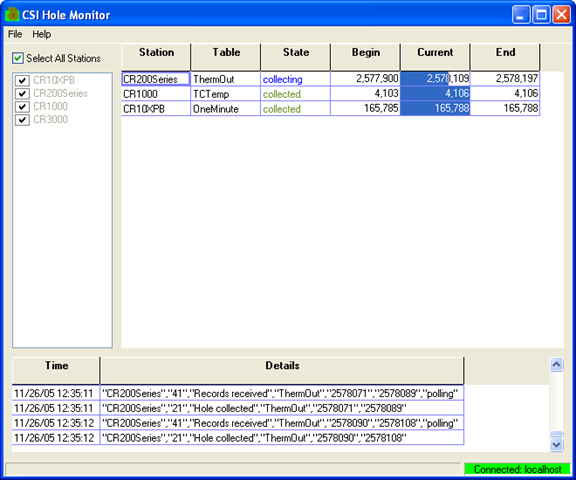
The list of stations in the LoggerNet datalogger network is displayed on the left side of the Hole Monitor Utility’s main window. You can monitor hole collection for all stations by enabling the Select All Stations check box above this list, or you can monitor a subset of these stations by clearing this check box and selecting the check box to the left of each datalogger that you want to monitor. If a hole is detected in the data for a datalogger that is being monitored, an informational record for the hole will be displayed on the right side of the window. The fields in the record are:
-
Station - The name of the datalogger for which a hole has been detected.
-
Table - The name of the table in the datalogger that has the hole.
-
State - The current state of the hole. The state options are:
-
detected – This state, printed with black text, indicates that the hole has been detected but attempts have not yet been made to collect it.
-
collecting – This state, printed with blue text, indicates that LoggerNet has made attempts to collect the hole since it was detected by the hole monitor application.
-
collected – This state, printed with green text, indicates that the server has succeeded in collecting the hole. Once the hole is collected, the information will be kept in the grid for a period of about fifteen seconds and then it will be removed.
-
lost – This state, printed in red text, indicates that a hole could not be collected because the data records no longer exist in datalogger. This can happen when the datalogger overwrites its oldest records before the LoggerNet server was able to collect those records.
Quite often, a portion of a hole will become uncollectable while a portion remains collectable. When this occurs, a new informational record will be created for the “lost” hole and the range for the collectable hole will be adjusted. The informational record for a lost hole will be displayed for approximately fifteen seconds and then deleted.
-
-
Begin - The beginning record for the hole that has been identified.
-
Current - The record currently being collected for the hole that has been identified.
-
End - The last record in the hole that has been identified.