Compile, Save, and Send
The CRBasic Editor allows you to send a program to a datalogger that has already been defined on the network map in LoggerNet, PC400, or RTDAQ. This only works if LoggerNet, PC400, or RTDAQ is running at the time you attempt to send the program.
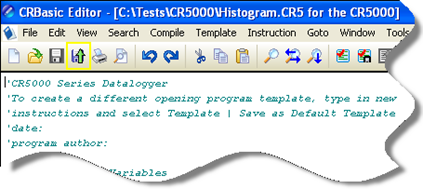
This function first checks the program for errors using the pre-compiler, then saves the program (using the current name, or by prompting the user for a name if the program is new). After the compile and save, this function sends the program to a user-specified datalogger. To do this, use the Compile, Save and Send item on the File menu or Compile menu, or you can press the corresponding button on the toolbar.
NOTE: When a file is sent to the datalogger using Compile, Save, and Send and the software is not actively connected to the datalogger, the software connects to the datalogger, sends the file, retrieves table definitions, and then disconnects. There will be little indication in the software that a connection was established.
When this function is chosen a dialog box is displayed. Below is the dialog box for a CR1000 datalogger:
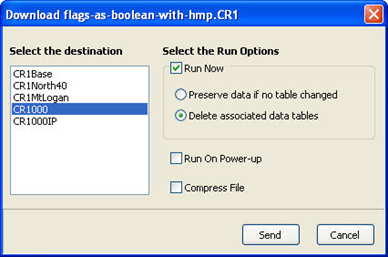
The Select the destination list shows all dataloggers configured within LoggerNet, PC400, or RTDAQ that may receive a program matching the extension of the current CRBasic program to be sent. Assume, for example, that you have three CR1000s and some other dataloggers in your LoggerNet, PC400, or RTDAQ network map. When you send a *.CR1 program, this screen will show only the three CR1000 dataloggers. Any other dataloggers will be excluded from the list in this case, even when they are defined in the network map, because those dataloggers are not associated with *.CR1 programs. A program with the extension of .DLD will be associated with all CRBasic-programmed datalogger types.
Select the datalogger to send the file to, and then select the
NOTE: The CR200 does not have an on-board compiler. A compiled binary (*.bin) file is sent to the datalogger. Run options are not applicable to this datalogger and are therefore disabled.
Compress File
If the Compress File check box is selected, a renamed version of the CRBasic program which has all unnecessary spaces, indentation, and comments removed in order to minimize the file size will be sent to the datalogger instead of the original program.
Sending the Program
To send the file and perform the associated functions you have selected in the screen, press the Send button. If LoggerNet, PC400, or RTDAQ is not running, an error message will appear indicating that there is no communications server currently running. If LoggerNet, PC400, or RTDAQ is running and the program compiles properly on the hardware, you will receive a message indicating that the program is now running on the datalogger. If something goes wrong when sending the program, a message will appear indicating the error conditions. This may be a hardware-level compile error or another failure as reported to the software by the datalogger’s program load and run process.
Press Cancel if you do not wish to send the program to the datalogger.
NOTE: When sending a program with the Compile, Save, and Send feature to a CR9000X datalogger while you are connected to the datalogger, you may get a disconnect message or similar notification. This is unique to the CR9000X datalogger and does not indicate any problem with the sending of the program. You can simply reconnect to the datalogger and continue your work.