Onboarding
This is an automated process to connect a data logger to a cloud environment.
Onboarding refers to an HTTP GET request to a specified URL, which returns a complete set of configuration settings required for the data logger to connect to an MQTT broker.
Purpose
Automates initial connection of new devices to a cloud
Eliminates the need for manual configuration deployment
Rotation of TLS certificates
Onboarding Workflow
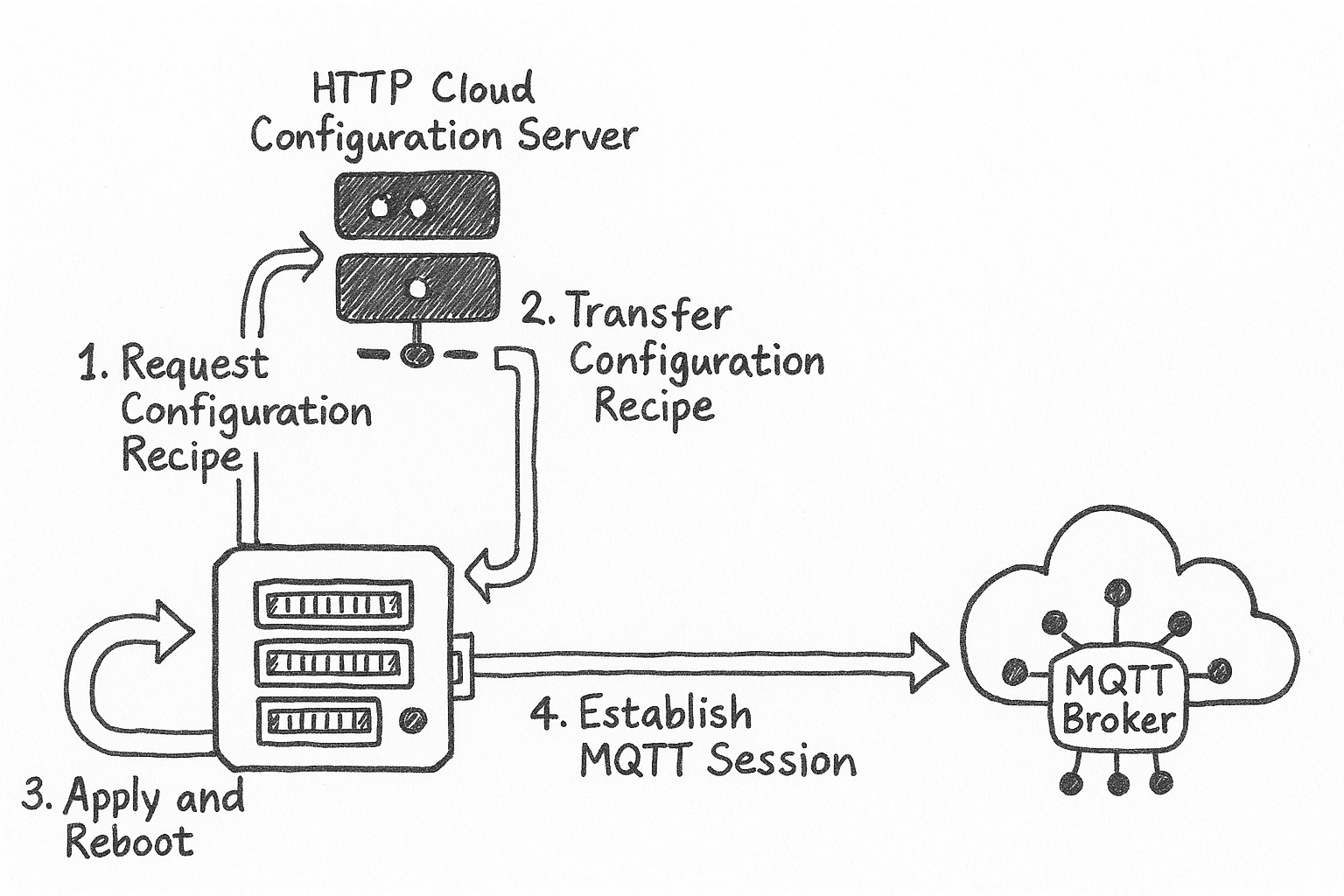
The onboarding process involves the following steps:
The data logger sends an HTTP GET request to a cloud configuration server to retrieve a configuration recipe. The server URL must be specified in the
Cloud Config URLsetting.Upon receiving the request, the server must respond with a valid configuration recipe file.
The data logger ingests the contents of the configuration recipe, applies the settings, and reboots to accommodate the changes.
After rebooting, the data logger attempts to establish an MQTT session with the specified broker.
Note
The success of this onboarding process depends heavily on the following:
The availability and correct configuration of the HTTP configuration server
The accuracy and completeness of the configuration recipe
The correct configuration of the MQTT broker (e.g., authentication methods, topic structures)
Onboarding to CampbellCloud
The following process will onboard a data logger to CampbellCloud. Device Configuration Utility will be used to configure the data logger.
Data Logger Configuration
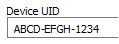
Confirm the device UID is set.
Confirm the Cloud Config URL is directed to CampbellCloud. [https://iot.campbell-cloud.com/api/v1/libraries/recipes]

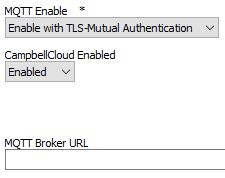
- Set:
MQTT Enable -
Enable with TLS-Mutual AuthenticationCampbellCloud Enabled -
EnabledMQTT Broker URL - Clear/Empty
Apply settings
Recipe
- The data logger will reboot after settings have been applied.
The Cloud Config URL is using HTTPS and MQTT(S). On reboot the data logger will automatically adjust the Max TLS Server connections = 1 to allocate memory for handling TLS communications. Allocating the memory for TLS will force the logger to reboot.
The Data logger will send an HTTP GET request to the Cloud Config URL to retrieve a configuration recipe
Example request:
GET /api/v1/libraries/recipes HTTP/1.1
User-Agent: CR6.14.3.0
Host: api.campbellcloud.xyz
Campbell-Product-UID: ABCD-EFGH-1234
Campbell-Protocol: mqtt
Example response:
HTTP/1.1 200 OK
Content-Disposition: attachment; filename=mqtt_onboard.bin
Content-Type: application/json
Content-Length: 45884
The data logger will save the recipe as CPU:mqtt_onboard.bin
    {
    "version": "1.0.1",
    "initial_configurations": [
        {
            "data": {
                "MQTTAccountID": "",
                "MQTTBaseTopic": "csV2/1111111111111111111112/1111111111111111111112/",
                "MQTTCleanSession": "0",
                "MQTTClientID": "ABCD-EFGH-1234",
                "MQTTEnable": "1",
                "MQTTEndpoint": "us-west-2.mqtt.campbell-cloud.com",
                "MQTTKeepAlive": "43200",
                "MQTTPassword": "",
                "MQTTPortNumber": "8883",
                "MQTTStateInterval": "0",
                "MQTTStatusInterval": "0",
                "MQTTUserName": "",
                "MQTTWillMessage": "ABCD-EFGH-1234",
                "MQTTWillQoS": "0",
                "MQTTWillRetain": "0",
                "MQTTWillTopic": "csV2/1111111111111111111112/1111111111111111111112/last",
                "TLSCertificate":
                                "-----BEGIN CERTIFICATE-----\n
                                MIICTzCCAfSgAwIBAgIUXgM1s0lmMRBPhhyeJaAflV3PdfowCgYIKoZIzj0EAwIw\n
                                GzEZMBcGA1UEAxMQY2FtcGJlbGxjbG91ZC5pbzAeFw0yNTA3MjgxNTQzNDZaFw0y\n
                                NTA4MTExNTQ0MTZaMBsxGTAXBgNVBAMTEGNhbXBiZWxsY2xvdWQuaW8wWTATBgcq\n
                                hkjOPQIBBggqhkjOPQMBBwNCAASqAHBIOc+yk/yxl35vAbm6ij7X7VaIx1EgBeVh\n
                                BYGL+GLUa5purvRqbBzaf/epFsl8lAxnpiDx3acmwgicdj0Go4IBFDCCARAwDgYD\n
                                VR0PAQH/BAQDAgOoMB0GA1UdJQQWMBQGCCsGAQUFBwMBBggrBgEFBQcDAjAdBgNV\n
                                HQ4EFgQUiPJvqZygJTXkYKNgwZO6/H1MU8YwHwYDVR0jBBgwFoAUPEGTAYBfmgf1\n
                                G4+j/THukkuALfIwPQYIKwYBBQUHAQEEMTAvMC0GCCsGAQUFBzAChiFodHRwOi8v\n
                                dmF1bHQudmF1bHQ6ODIwMC92MS9wa2kvY2EwKwYDVR0RBCQwIoIOVDQ4VC1DQlNK\n
                                LVRERkKCEGNhbXBiZWxsY2xvdWQuaW8wMwYDVR0fBCwwKjAooCagJIYiaHR0cDov\n
                                L3ZhdWx0LnZhdWx0OjgyMDAvdjEvcGtpL2NybDAKBggqhkjOPQQDAgNJADBGAiEA\n
                                hto5MoEt4SsQgzV8VhTCWv02BVDoUMKLM9T4SmKyM98CIQCqgXKlYmC8nX81q/L4\n
                                rw4V+k1Hp3oreFn3PC2a5/dOHQ==\n
                                -----END CERTIFICATE-----",
                "TLSPrivateKey":
                                "-----BEGIN EC PRIVATE KEY-----\n
                                MHcCAQEEIK7Hc/snAotxLnwE52dfpa9uFBsLKm5fwOnaie0urJfKoAoGCCqGSM49\n
                                AwEHoUQDQgAEqgBwSDnPspP8sZd+bwG5uoo+1+1WiMdRIAXlYQWBi/hi1Guabq70\n
                                amwc2n/3qRbJfJQMZ6Yg8d2nJsIInHY9Bg==\n
                                -----END EC PRIVATE KEY-----",
                "TLSRootCA":
                                "-----BEGIN CERTIFICATE-----\n
                                MIIBuTCCAV+gAwIBAgIUKuUUaYKi1Zc5QEZE13dBRURqFRwwCgYIKoZIzj0EAwIw\n
                                GzEZMBcGA1UEAxMQY2FtcGJlbGxjbG91ZC5pbzAeFw0yNDA5MjUyMTQ3NDdaFw0y\n
                                OTA5MjQyMTQ4MTdaMBsxGTAXBgNVBAMTEGNhbXBiZWxsY2xvdWQuaW8wWTATBgcq\n
                                hkjOPQIBBggqhkjOPQMBBwNCAAQ0KR8u0JLhZ44w/GeFEScRIRdwxbCKuhP1Oxn8\n
                                ddQNZz2Gk9tdUoZ7tOj8TwWHQeoKBSG1wdu+YlaD590lm0Lyo4GAMH4wDgYDVR0P\n
                                AQH/BAQDAgEGMA8GA1UdEwEB/wQFMAMBAf8wHQYDVR0OBBYEFDxBkwGAX5oH9RuP\n
                                o/0x7pJLgC3yMB8GA1UdIwQYMBaAFDxBkwGAX5oH9RuPo/0x7pJLgC3yMBsGA1Ud\n
                                EQQUMBKCEGNhbXBiZWxsY2xvdWQuaW8wCgYIKoZIzj0EAwIDSAAwRQIhAJbpmTXi\n
                                crig68ws7iBb6UZwBc9kNyh6dUQwi677qdv4AiArQAj8kPywtwQK/eEloJt09bo2\n
                                YDzU0dSLY9zEhRDceA==\n
                                -----END CERTIFICATE-----"
            },
            "name": "setting"
        }
    ],
    "metadata": {
        "cert_exp_timestamp": "2025-08-11T15:44:16Z"
    },
    "certificate": {
        "issued_epoch": 1753717456611,
        "serialNumber": "5e:03:35:b3:49:66:31:10:4f:86:1c:9e:25:a0:1f:95:5d:cf:75:fa",
        "expiration": "2025-08-11T15:44:16Z",
        "expiration_epoch": 1754927056000
    },
    "name": "cloud_onboard",
    "acl": {
        "csV2/1111111111111111111112/1111111111111111111112/cr/7GY3-DZYK-KBWF/#": "w",
        "csV2/1111111111111111111112/1111111111111111111112/cc/7GY3-DZYK-KBWF/#": "r"
    }
}
When the Recipe is received the settings and TLS certificates will be applied and the data logger will reboot again. The data logger may take a few minutes to connect to the cloud.
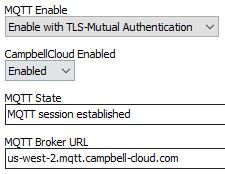
10. After onboarding, the data logger is ready to be claimed as an asset in CampbellCloud.
If the base topic and last will topic appear as a sequence of 1’s
(e.g., csV2/1111111111111111111112/1111111111111111111112/), this
indicates that the data logger is connected to CampbellCloud but has not
yet been claimed.
Onboarding to Custom Environment
Onboarding to a custom environment follows the same process as onboarding to CampbellCloud.
MQTT is not a requirement for onboarding. When paired with a valid and constructive recipe, the onboarding process can be used to onboard a data logger to any custom environment.
An HTTP server must be available for the data logger to request the onboarding recipe.
The
Cloud Config URLsetting must point to the server responsible for handling the HTTP GET request.The server must respond with a valid recipe that includes any necessary settings and operations for the data logger to execute. see Recipes